> ## Documentation Index
> Fetch the complete documentation index at: https://docs-staging-update-explain-log-stream-pause.mintlify.site/llms.txt
> Use this file to discover all available pages before exploring further.
> Learn how to promote a connection to domain level using the Auth0 Dashboard or Auth0 Management API.
# Promote Connections to Domain Level
export const AuthCodeGroup = ({children, dropdown}) => {
const [processedChildren, setProcessedChildren] = useState(children);
useEffect(() => {
let unsubscribe = null;
function init() {
unsubscribe = window.autorun(() => {
const processChildren = node => {
if (typeof node === "string") {
let processedNode = node;
for (const [key, value] of window.rootStore.variableStore.values.entries()) {
const escapedKey = key.replaceAll(/[.*+?^${}()|[\]\\]/g, (String.raw)`\$&`);
processedNode = processedNode.replaceAll(new RegExp(escapedKey, "g"), value);
}
return processedNode;
} else if (Array.isArray(node)) {
return node.map(processChildren);
} else if (node && node.props && node.props.children) {
return {
...node,
props: {
...node.props,
children: processChildren(node.props.children)
}
};
}
return node;
};
setProcessedChildren(processChildren(children));
});
}
if (window.rootStore) {
init();
} else {
window.addEventListener("adu:storeReady", init);
}
return () => {
window.removeEventListener("adu:storeReady", init);
unsubscribe?.();
};
}, [children]);
return {processedChildren};
};
export const AuthCodeBlock = ({filename, icon, language, highlight, children}) => {
const [displayText, setDisplayText] = useState(children);
const [copyText, setCopyText] = useState(children);
const wrapperRef = React.useRef(null);
useEffect(() => {
let unsubscribe = null;
function init() {
if (!window.autorun || !window.rootStore) {
return;
}
unsubscribe = window.autorun(() => {
let processedChildrenForDisplay = children;
let processedChildrenForCopy = children;
for (const [key, value] of window.rootStore.variableStore.values.entries()) {
const escapedKey = key.replaceAll(/[.*+?^${}()|[\]\\]/g, (String.raw)`\$&`);
let displayValue = value;
if (key === "{yourClientSecret}" && value !== "{yourClientSecret}") {
displayValue = value.substring(0, 3) + "*****MASKED*****";
}
processedChildrenForDisplay = processedChildrenForDisplay.replaceAll(new RegExp(escapedKey, "g"), displayValue);
processedChildrenForCopy = processedChildrenForCopy.replaceAll(new RegExp(escapedKey, "g"), value);
}
setDisplayText(processedChildrenForDisplay);
setCopyText(processedChildrenForCopy);
});
}
if (window.rootStore) {
init();
} else {
window.addEventListener("adu:storeReady", init);
}
return () => {
window.removeEventListener("adu:storeReady", init);
unsubscribe?.();
};
}, [children]);
useEffect(() => {
if (!wrapperRef.current) return;
const originalWriteText = navigator.clipboard.writeText.bind(navigator.clipboard);
let isOverriding = false;
const handleClick = e => {
const button = e.target.closest('[data-testid="copy-code-button"]');
if (!button || !wrapperRef.current.contains(button)) return;
isOverriding = true;
navigator.clipboard.writeText = text => {
if (isOverriding) {
isOverriding = false;
navigator.clipboard.writeText = originalWriteText;
return originalWriteText(copyText);
}
return originalWriteText(text);
};
setTimeout(() => {
if (isOverriding) {
isOverriding = false;
navigator.clipboard.writeText = originalWriteText;
}
}, 100);
};
const wrapper = wrapperRef.current;
wrapper.addEventListener('click', handleClick, true);
return () => {
wrapper.removeEventListener('click', handleClick, true);
if (navigator.clipboard.writeText !== originalWriteText) {
navigator.clipboard.writeText = originalWriteText;
}
};
}, [copyText]);
return
{displayText}
;
};
When you promote a connection to the domain level, any [third-party application](/docs/get-started/applications/third-party-applications) in your tenant can use it to authenticate users. This enables third-party applications to access your identity providers. Third-party applications can only use domain-level connections, except through [Cross App Access (XAA)](/docs/secure/call-apis-on-users-behalf/xaa), where access is authorized in the corresponding enterprise IdP.
Because dynamically registered clients cannot be individually mapped to connections at creation time, you must promote connections to the domain level when you use [Dynamic Client Registration](/docs/get-started/applications/dynamic-client-registration).
You can promote a connection using the Auth0 Dashboard or the Management API.
You can promote a connection to the domain level directly from the Auth0 Dashboard. This option is available for all connection types (Database, Social, Enterprise, and Passwordless).
1. Navigate to **Dashboard > Authentication** and select the connection type (e.g., **Database, Social, Enterprise**).
2. Create a new connection or select an existing one to configure.
3. Go to the **Settings** tab.
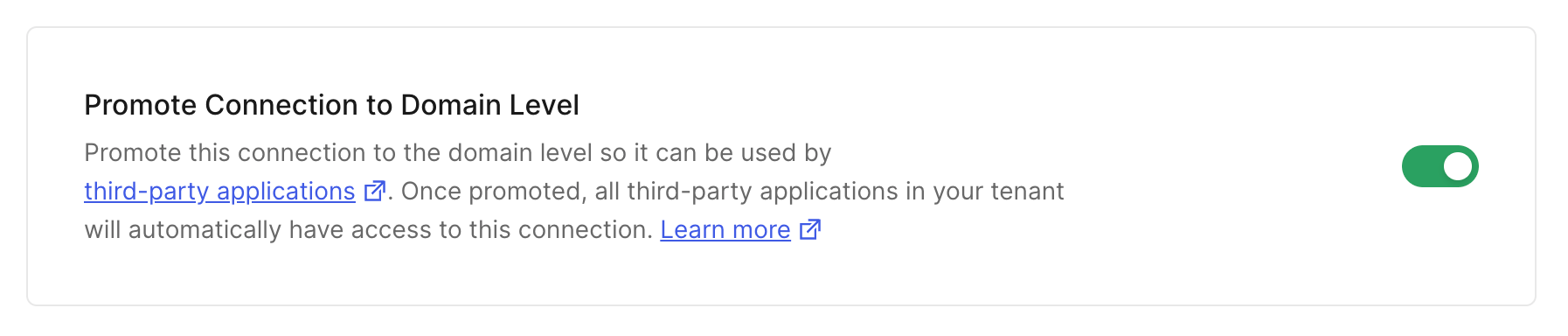
4. Scroll down to find the **Promote Connection to Domain Level** setting, which is typically in the **Advanced** section.
5. Enable the toggle switch.
 6. Click **Save Changes**.
Alternatively, you can promote a connection using a `PATCH` call to the [Update a Connection endpoint](https://auth0.com/docs/api/management/v2#!/Connections/patch_connections_by_id) of the Management API. Be sure to replace the `CONNECTION_ID` and `MGMT_API_ACCESS_TOKEN` placeholder values with your specific information.
```bash cURL theme={null}
curl --request PATCH \
--url 'https://{yourDomain}/api/v2/connections/CONNECTION_ID' \
--header 'authorization: Bearer MGMT_API_ACCESS_TOKEN' \
--header 'cache-control: no-cache' \
--header 'content-type: application/json' \
--data '{ "is_domain_connection": true }'
```
```csharp C# theme={null}
var client = new RestClient("https://{yourDomain}/api/v2/connections/CONNECTION_ID");
var request = new RestRequest(Method.PATCH);
request.AddHeader("content-type", "application/json");
request.AddHeader("authorization", "Bearer MGMT_API_ACCESS_TOKEN");
request.AddHeader("cache-control", "no-cache");
request.AddParameter("application/json", "{ "is_domain_connection": true }", ParameterType.RequestBody);
IRestResponse response = client.Execute(request);
```
```go Go theme={null}
package main
import (
"fmt"
"strings"
"net/http"
"io/ioutil"
)
func main() {
url := "https://{yourDomain}/api/v2/connections/CONNECTION_ID"
payload := strings.NewReader("{ "is_domain_connection": true }")
req, _ := http.NewRequest("PATCH", url, payload)
req.Header.Add("content-type", "application/json")
req.Header.Add("authorization", "Bearer MGMT_API_ACCESS_TOKEN")
req.Header.Add("cache-control", "no-cache")
res, _ := http.DefaultClient.Do(req)
defer res.Body.Close()
body, _ := ioutil.ReadAll(res.Body)
fmt.Println(res)
fmt.Println(string(body))
}
```
```java Java theme={null}
HttpResponse response = Unirest.patch("https://{yourDomain}/api/v2/connections/CONNECTION_ID")
.header("content-type", "application/json")
.header("authorization", "Bearer MGMT_API_ACCESS_TOKEN")
.header("cache-control", "no-cache")
.body("{ "is_domain_connection": true }")
.asString();
```
```javascript Node.JS theme={null}
var axios = require("axios").default;
var options = {
method: 'PATCH',
url: 'https://{yourDomain}/api/v2/connections/CONNECTION_ID',
headers: {
'content-type': 'application/json',
authorization: 'Bearer MGMT_API_ACCESS_TOKEN',
'cache-control': 'no-cache'
},
data: {is_domain_connection: true}
};
axios.request(options).then(function (response) {
console.log(response.data);
}).catch(function (error) {
console.error(error);
});
```
```php PHP theme={null}
$curl = curl_init();
curl_setopt_array($curl, [
CURLOPT_URL => "https://{yourDomain}/api/v2/connections/CONNECTION_ID",
CURLOPT_RETURNTRANSFER => true,
CURLOPT_ENCODING => "",
CURLOPT_MAXREDIRS => 10,
CURLOPT_TIMEOUT => 30,
CURLOPT_HTTP_VERSION => CURL_HTTP_VERSION_1_1,
CURLOPT_CUSTOMREQUEST => "PATCH",
CURLOPT_POSTFIELDS => "{ "is_domain_connection": true }",
CURLOPT_HTTPHEADER => [
"authorization: Bearer MGMT_API_ACCESS_TOKEN",
"cache-control: no-cache",
"content-type: application/json"
],
]);
$response = curl_exec($curl);
$err = curl_error($curl);
curl_close($curl);
if ($err) {
echo "cURL Error #:" . $err;
} else {
echo $response;
}
```
```python Python theme={null}
import http.client
conn = http.client.HTTPSConnection("")
payload = "{ "is_domain_connection": true }"
headers = {
'content-type': "application/json",
'authorization': "Bearer MGMT_API_ACCESS_TOKEN",
'cache-control': "no-cache"
}
conn.request("PATCH", "/{yourDomain}/api/v2/connections/CONNECTION_ID", payload, headers)
res = conn.getresponse()
data = res.read()
print(data.decode("utf-8"))
```
```ruby Ruby theme={null}
require 'uri'
require 'net/http'
require 'openssl'
url = URI("https://{yourDomain}/api/v2/connections/CONNECTION_ID")
http = Net::HTTP.new(url.host, url.port)
http.use_ssl = true
http.verify_mode = OpenSSL::SSL::VERIFY_NONE
request = Net::HTTP::Patch.new(url)
request["content-type"] = 'application/json'
request["authorization"] = 'Bearer MGMT_API_ACCESS_TOKEN'
request["cache-control"] = 'no-cache'
request.body = "{ "is_domain_connection": true }"
response = http.request(request)
puts response.read_body
```
| Value | Description |
| ----------------------- | -------------------------------------------------------------------------------------------------------------------------------------------------------- |
| `CONNECTION_ID` | Τhe ID of the connection to be promoted. |
| `MGMT_API_ACCESS_TOKEN` | [Access Token for the Management API](https://auth0.com/docs/api/management/v2/tokens) with the [scope](/docs/glossary?term=scope) `update:connections`. |
6. Click **Save Changes**.
Alternatively, you can promote a connection using a `PATCH` call to the [Update a Connection endpoint](https://auth0.com/docs/api/management/v2#!/Connections/patch_connections_by_id) of the Management API. Be sure to replace the `CONNECTION_ID` and `MGMT_API_ACCESS_TOKEN` placeholder values with your specific information.
```bash cURL theme={null}
curl --request PATCH \
--url 'https://{yourDomain}/api/v2/connections/CONNECTION_ID' \
--header 'authorization: Bearer MGMT_API_ACCESS_TOKEN' \
--header 'cache-control: no-cache' \
--header 'content-type: application/json' \
--data '{ "is_domain_connection": true }'
```
```csharp C# theme={null}
var client = new RestClient("https://{yourDomain}/api/v2/connections/CONNECTION_ID");
var request = new RestRequest(Method.PATCH);
request.AddHeader("content-type", "application/json");
request.AddHeader("authorization", "Bearer MGMT_API_ACCESS_TOKEN");
request.AddHeader("cache-control", "no-cache");
request.AddParameter("application/json", "{ "is_domain_connection": true }", ParameterType.RequestBody);
IRestResponse response = client.Execute(request);
```
```go Go theme={null}
package main
import (
"fmt"
"strings"
"net/http"
"io/ioutil"
)
func main() {
url := "https://{yourDomain}/api/v2/connections/CONNECTION_ID"
payload := strings.NewReader("{ "is_domain_connection": true }")
req, _ := http.NewRequest("PATCH", url, payload)
req.Header.Add("content-type", "application/json")
req.Header.Add("authorization", "Bearer MGMT_API_ACCESS_TOKEN")
req.Header.Add("cache-control", "no-cache")
res, _ := http.DefaultClient.Do(req)
defer res.Body.Close()
body, _ := ioutil.ReadAll(res.Body)
fmt.Println(res)
fmt.Println(string(body))
}
```
```java Java theme={null}
HttpResponse response = Unirest.patch("https://{yourDomain}/api/v2/connections/CONNECTION_ID")
.header("content-type", "application/json")
.header("authorization", "Bearer MGMT_API_ACCESS_TOKEN")
.header("cache-control", "no-cache")
.body("{ "is_domain_connection": true }")
.asString();
```
```javascript Node.JS theme={null}
var axios = require("axios").default;
var options = {
method: 'PATCH',
url: 'https://{yourDomain}/api/v2/connections/CONNECTION_ID',
headers: {
'content-type': 'application/json',
authorization: 'Bearer MGMT_API_ACCESS_TOKEN',
'cache-control': 'no-cache'
},
data: {is_domain_connection: true}
};
axios.request(options).then(function (response) {
console.log(response.data);
}).catch(function (error) {
console.error(error);
});
```
```php PHP theme={null}
$curl = curl_init();
curl_setopt_array($curl, [
CURLOPT_URL => "https://{yourDomain}/api/v2/connections/CONNECTION_ID",
CURLOPT_RETURNTRANSFER => true,
CURLOPT_ENCODING => "",
CURLOPT_MAXREDIRS => 10,
CURLOPT_TIMEOUT => 30,
CURLOPT_HTTP_VERSION => CURL_HTTP_VERSION_1_1,
CURLOPT_CUSTOMREQUEST => "PATCH",
CURLOPT_POSTFIELDS => "{ "is_domain_connection": true }",
CURLOPT_HTTPHEADER => [
"authorization: Bearer MGMT_API_ACCESS_TOKEN",
"cache-control: no-cache",
"content-type: application/json"
],
]);
$response = curl_exec($curl);
$err = curl_error($curl);
curl_close($curl);
if ($err) {
echo "cURL Error #:" . $err;
} else {
echo $response;
}
```
```python Python theme={null}
import http.client
conn = http.client.HTTPSConnection("")
payload = "{ "is_domain_connection": true }"
headers = {
'content-type': "application/json",
'authorization': "Bearer MGMT_API_ACCESS_TOKEN",
'cache-control': "no-cache"
}
conn.request("PATCH", "/{yourDomain}/api/v2/connections/CONNECTION_ID", payload, headers)
res = conn.getresponse()
data = res.read()
print(data.decode("utf-8"))
```
```ruby Ruby theme={null}
require 'uri'
require 'net/http'
require 'openssl'
url = URI("https://{yourDomain}/api/v2/connections/CONNECTION_ID")
http = Net::HTTP.new(url.host, url.port)
http.use_ssl = true
http.verify_mode = OpenSSL::SSL::VERIFY_NONE
request = Net::HTTP::Patch.new(url)
request["content-type"] = 'application/json'
request["authorization"] = 'Bearer MGMT_API_ACCESS_TOKEN'
request["cache-control"] = 'no-cache'
request.body = "{ "is_domain_connection": true }"
response = http.request(request)
puts response.read_body
```
| Value | Description |
| ----------------------- | -------------------------------------------------------------------------------------------------------------------------------------------------------- |
| `CONNECTION_ID` | Τhe ID of the connection to be promoted. |
| `MGMT_API_ACCESS_TOKEN` | [Access Token for the Management API](https://auth0.com/docs/api/management/v2/tokens) with the [scope](/docs/glossary?term=scope) `update:connections`. |