> ## Documentation Index
> Fetch the complete documentation index at: https://docs-staging-update-explain-log-stream-pause.mintlify.site/llms.txt
> Use this file to discover all available pages before exploring further.
# Find Your Tenant Name or Tenant ID
> Find your Auth0 tenant name and ID in the Dashboard to use when you configure SDKs, call APIs, or substitute variables in Auth0 documentation.
Every Auth0 tenant has a name. You use this name frequently in your code to identify the tenant. When you see the `{yourTenantId}`, `{yourTenantName}`, `{yourTenant}`, or similar variable in the Auth0 documentation, substitute the variable with the tenant name.
1. Go to the [Auth0 Dashboard](https://manage.auth0.com/#).
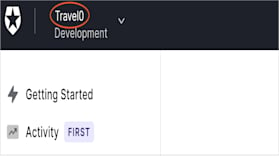
2. In the top-left corner, find the tenant name beside the Auth0 logo.
 ## Learn more
* [Tenant Settings](/docs/get-started/tenant-settings)
* [Multi-Tenant Applications Best Practices](/docs/get-started/auth0-overview/create-tenants/multi-tenant-apps-best-practices)
## Learn more
* [Tenant Settings](/docs/get-started/tenant-settings)
* [Multi-Tenant Applications Best Practices](/docs/get-started/auth0-overview/create-tenants/multi-tenant-apps-best-practices)